Table of Contents
Why do you want to take these measures of body volume?
This year we are collecting data on body volume. This will allow researchers to examine the way our body shape affects our health. For health research it is important to get accurate measures, and so during your interview you will have been asked to provide measures of the distance around your hips and your waist, and an interviewer may have measured your height and weight.
What is the Body Volume app?
The Body Volume app uses the camera in your smartphone or tablet to take two pictures of your body; one from the front and one from the side. The app will convert the pictures into outlines of your body shape. These outlines will be uploaded to a server in the UK and some measures will be calculated based on your body shape. The app will only upload the outlines, it will not upload the photos. The measures calculated include your waist-hip ratio, your waist circumference, total body fat, visceral fat (around your inner organs), lengths of body parts (e.g. right length of inside leg from crotch to floor), and the Body Volume Index (BVI), which is a health risk indicator. The outlines of your body shape will then be deleted.
Do I have to download and use the app?
No, this part of the project, like the rest of Understanding Society, is completely voluntary.
How can I get the Body Volume app?
The Body Volume app is available for iPhones or iPads and Android devices in the app store – search for “Body Volume” and look for this logo:

You can also follow these links:
iOS / Apple: https://apps.apple.com/us/app/bodyvolume/id1617834917
Android devices: https://play.google.com/store/apps/details?id=com.select.understandingsociety
Or you can scan the QR codes below:
iPhones or iPads

Android devices

How do I log in to the app?
When you first open the app you will be asked to enter your Access Code, this will be given to you by your interviewer, or displayed on the screen if you completed the study online. If we have an email address for you, we will also send you an email with this information after your interview. After you have entered your Access Code, please wait a little while for the app to load. Once you’ve logged in, you will see three introduction screens with more information about how to use the app.
How do I use the app to take a scan?
After you select “Scan Body Volume” on the main menu, you will get a chance to watch a short video that will explain how you can scan yourself, or how someone else can scan you. You can also watch those videos by clicking the links below:
Scan yourself: https://youtube.com/shorts/FaQI0s-QvVs?feature=share
Have someone scan you: https://youtube.com/shorts/xsC6FNiKVBY?feature=share
To take the scan you should be wearing tight-fitting clothes and stand against an uncluttered background. You will need to position your device at a distance from you so that your whole body is captured by the camera. The device should be positioned upright, a red light will indicate whether it is tipped too far backwards or forwards.
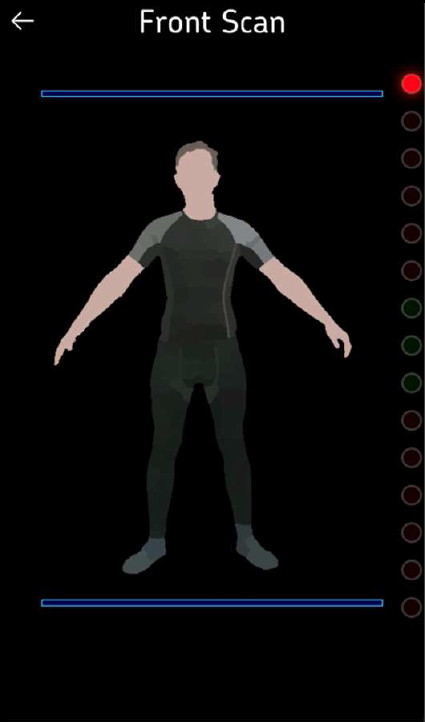
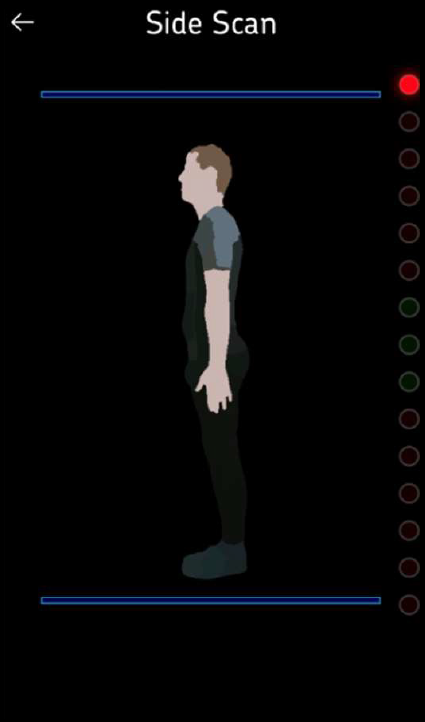
When the device is correctly positioned you can press the camera button – you then have a 10 second countdown to get into the correct position before the scan is taken – this takes a little bit of time. The first scan should be taken with you facing the device and your arms held out at your sides and the second scan taken with you facing the side:
What if I have technical problems or cannot log in?
If you have a problem, please contact our Participant Helpline on contact@understandingsociety.ac.uk or call 0800 252 853 during office hours. We will pass technical queries on to Select Research and so there may be a delay in getting back to you.
What data is uploaded? Are my pictures uploaded?
None of the images processed during the scan process are stored or sent anywhere. The only information sent is the information you entered on ‘Your Profile’, your responses to the questions about taking the scan, and your results (the body measurements calculated by the app).